Tercer Juego en Pygame
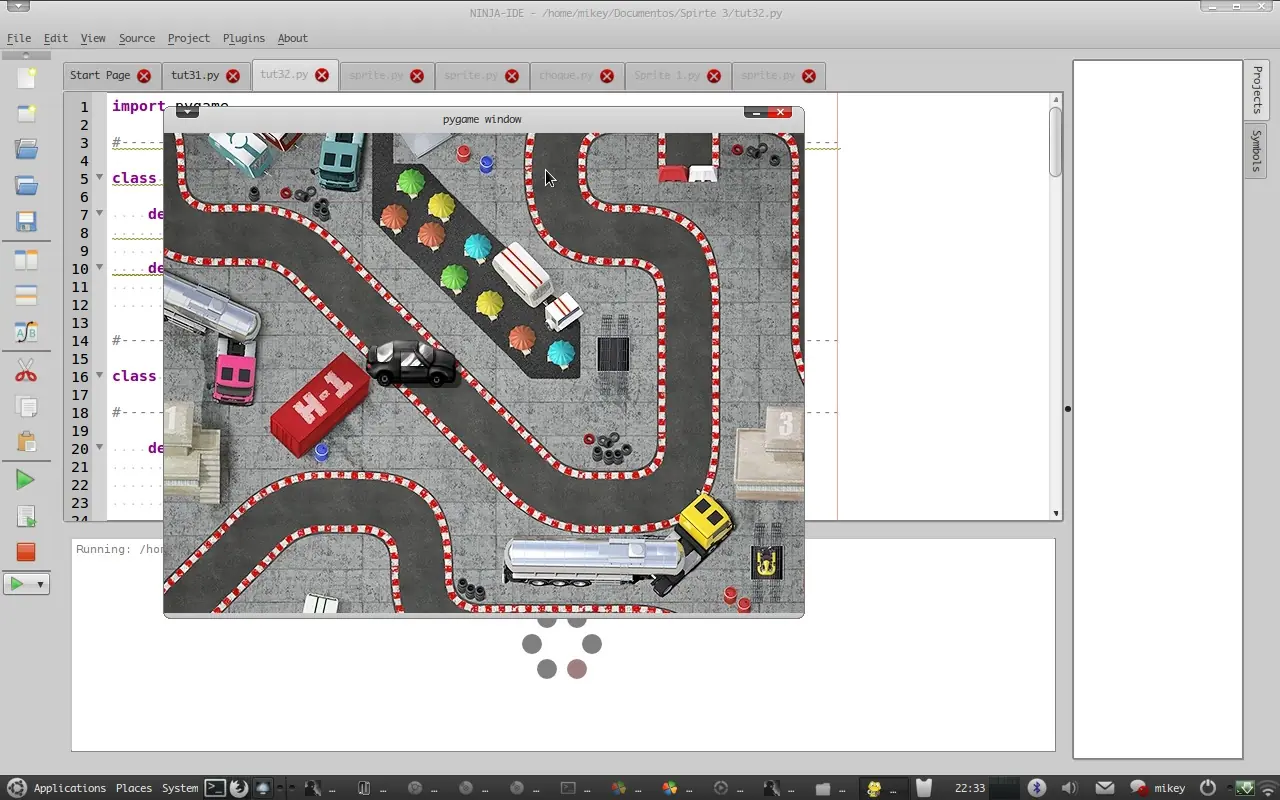
Hola a todos en esta ocasión les traigo el código de mi tercer juego en pygame, bueno no se si considerarlo un juego pero utiliza todas las funciones necesarias para un juego, como mover un personaje y darle animación y que se mueva el fondo, bueno se trata de un pequeño carro que se mueve por la pantalla, es muy sencillo espero les sea de utilidad y pronto estera escribiendo el manual respectivo para dar la explicación de su funcionamiento, en la comunidad colocare el enlace para descargar las imágenes y el código gracias y espero les guste
import pygame


#--------------------------------------------------------------------------------


class Fondo(pygame.sprite.Sprite):


    def __init__(self):

        self.imagen=pygame.image.load("fondo.jpg").convert_alpha()

        self.rect=self.imagen.get_rect()

    def update(self,pantalla,vx,vy):

        self.rect.move_ip(-vx,-vy)

        pantalla.blit(self.imagen,self.rect)


#--------------------------------------------------------------------------------


class Player(pygame.sprite.Sprite):


#--------------------------------------------------------------------------------


    def __init__(self):

        self.imagen1=pygame.image.load("car3.png").convert_alpha()

        self.imagen2=pygame.image.load("car4.png").convert_alpha()

        self.imagen3=pygame.image.load("car1.png").convert_alpha()

        self.imagen4=pygame.image.load("car2.png").convert_alpha()

        self.imagenes=[[self.imagen3,self.imagen1],[self.imagen4,self.imagen2]]

        self.imagen_actual=0

        self.imagen=self.imagenes[self.imagen_actual][0]

        self.rect=self.imagen.get_rect()

        self.rect.top,self.rect.left=(200,200)

        self.estamoviendo=False

        self.orientacion=0


#--------------------------------------------------------------------------------


    def mover(self,vx,vy):

       self.rect.move_ip(vx,vy)


#--------------------------------------------------------------------------------


    def update(self,superficie,vx,vy,t,x,y):

        if (vx,vy)==(0,0): self.estamoviendo=False

        else:self.estamoviendo=True # si se mueve que este en TRUE

        if vx>0: self.orientacion=0

        elif vx<0: self.orientacion=1

        if t==1 and self.estamoviendo:


            if x==1:

                self.imagen_actual=0

            else:

                if y==1:

                   self.imagen_actual=1

                   self.orientacion=1

                else:

                    if y==2:

                        self.imagen_actual=1

                        self.orientacion=0

        vx=0

        vy=0

        self.mover(vx, vy)

        self.imagen=self.imagenes[self.orientacion][self.imagen_actual]

        superficie.blit(self.imagen,self.rect)


#--------------------------------------------------------------------------------


def main():

    import pygame

    pygame.init()

    pantalla=pygame.display.set_mode((640,480))

    salir=False

    reloj1= pygame.time.Clock()

    player1=Player()

    fondo1=Fondo()

    vx,vy=0,0

    velocidad=7

    x=0

    y=0

    leftsigueapretada,rightsigueapretada,upsigueapretada,downsigueapretada=False,False,False,False

    t=0

    while salir!=True:

        for event in pygame.event.get():

            if event.type == pygame.QUIT:

                salir=True

            if event.type == pygame.KEYDOWN:

                if event.key == pygame.K_LEFT:

                    leftsigueapretada=True

                    vx=-velocidad

                    x=1

                if event.key == pygame.K_RIGHT:

                    rightsigueapretada=True

                    vx=velocidad

                    x=1

                if event.key== pygame.K_UP:

                    upsigueapretada=True

                    vy=-velocidad

                    y=1

                if event.key == pygame.K_DOWN:

                    downsigueapretada=True

                    vy=velocidad

                    y=2

            if event.type == pygame.KEYUP:

                if event.key == pygame.K_LEFT:

                    leftsigueapretada=False

                    if rightsigueapretada:vx=velocidad

                    else:

                         vx=0

                         x=0

                if event.key == pygame.K_RIGHT:

                    rightsigueapretada=False

                    if leftsigueapretada:vx=-velocidad

                    else:

                         vx=0

                         x=0

                if event.key== pygame.K_UP:

                    upsigueapretada=False

                    if downsigueapretada:vy=velocidad

                    else:

                          vy=-0

                          y=0

                if event.key == pygame.K_DOWN:

                    downsigueapretada=False

                    if upsigueapretada:vy=-velocidad

                    else:

                         vy=0

                         y=0

        reloj1.tick(25)

        t+=1

        if t>1:

            t=0

        pantalla.fill((0,0,0))

        fondo1.update(pantalla,vx,vy)

        player1.update(pantalla,vx,vy,t,x,y)

        pygame.display.update()

    pygame.quit()


main()
Comunidad
Bueno a qui esta el archivo con todos los elementos del juego las imágenes y el sonido, apenas termine el manual lo publicare para que se entienda de una manera mejor el código, dentro de la comunidad esta el enlace para descargar el código