Buenas Noches Gente, en esta ocasion les traigo esta pequeña herramienta para usar nuestro joystick generico de PC como si fuese uno de Xbox 360, yo tengo uno marca "CrOmax" que me costo $50 (arg) y lo uso para juegos que requieren controlador de XBox 360 original. Ideal para ratas y gamers. [Léase "AOXH"] 

En fin, se los dejo en varios servers ya que no pesa mas de 200kb, eljan el que quieran
En fin, se los dejo en varios servers ya que no pesa mas de 200kb, eljan el que quieran
MediaFire
El pass para todo es:
"aoxh" .si comillas-
"Ya lo descargue, que hago ahora?"En este caso voy a tomar como ejemplo el Bulletstorm, pero funciona para cualquier juego que requiera un controlador original.
Copiamos: dinput8.dll,xbox360cemu.ini,xinput1_3.dll,xinput9_1_0.dll,xinput9_1_0.dll,XInputTest.exe. A la carpeta base en donde esta el juego, por ejemplo el Bulletstorm se instalo en:
"C
Copiamos dichos archivos a esa carpeta, y listo.
Para configurar este control, debemos ejecutar "XInputTest.exe" y nos saldra esto:
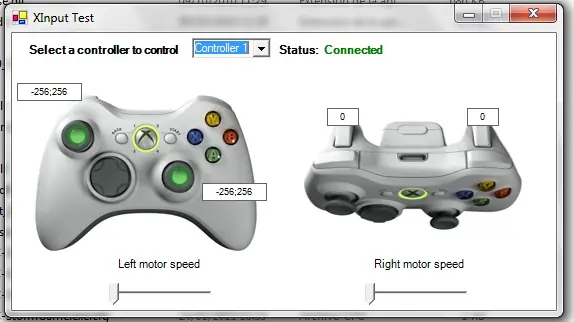
Donde Ven, mi joystick generico lo marca como conectado, osea que si lo reconoce y esta listo para ser emulado.
Otra, si por alguna razon nos sale los botones cruzados, tienen que abrir "xbox360cemu.ini" y editar lo que esta en negrita:[Options]
UseAutoPad=0#use 0 to 1; automatically make other PAD to PAD1 after detecting movement
UseInitBeep=1#use 0 to 1; default 1; beep on init
#Logitech Cordless Rumblepad 2 / Generic Rumble Controller
Index=0#controller index in game controllers list; 0 is first; -1 to ignore this pad
Left Analog X=1#axis index; use - to invert; precede with 's' for a slider eg; s-1; 7 to disable
Left Analog Y=-2#axis index; use - to invert; precede with 's' for a slider eg; s-1; 7 to disable
Right Analog X=3#axis index; use - to invert; precede with 's' for a slider eg; s-1; 7 to disable
Right Analog Y=-6#axis index; use - to invert; precede with 's' for a slider eg; s-1; 7 to disable
Left Analog X Linear=0#-100 to +100 raise this number to increase sensitivity near center
Left Analog Y Linear=0#-100 to +100 raise this number to increase sensitivity near center
Right Analog X Linear=0#-100 to +100 raise this number to increase sensitivity near center
Right Analog Y Linear=0#-100 to +100 raise this number to increase sensitivity near center
Left Analog X+ Button=0#button id; 0 to disable
Left Analog X- Button=0#button id; 0 to disable
Left Analog Y+ Button=0#button id; 0 to disable
Left Analog Y- Button=0#button id; 0 to disable
Right Analog X+ Button=0#button id; 0 to disable
Right Analog X- Button=0#button id; 0 to disable
Right Analog Y+ Button=0#button id; 0 to disable
Right Analog Y- Button=0#button id; 0 to disable
D-pad POV=1#POV index; 0 to disable
D-pad Up=0#button id; 0 to disable
D-pad Down=0#button id; 0 to disable
D-pad Left=0#button id; 0 to disable
D-pad Right=0#button id; 0 to disable
A=2#button id; 0 to disable
B=3#button id; 0 to disable
X=1#button id; 0 to disable
Y=4#button id; 0 to disable
Left Shoulder=5#button id; 0 to disable
Right Shoulder=6#button id; 0 to disable
Back=9#button id; 0 to disable
Start=10#button id; 0 to disable
Left Thumb=11#button id; 0 to disable
Right Thumb=12#button id; 0 to disable
Left Trigger=7#button id; precede with 'a' for an axis; eg; a-6; for a slider precede with 's' eg; s-1
Right Trigger=8#button id; precede with 'a' for an axis; eg; a-6; for a slider precede with 's' eg; s-1
UseForceFeedback=1#use 0 to 1; default 0
ForceLargeGain=10000#use 0 to 10000; default 10000; effect intensity
ForceLargePeriod=120000#use 0 to 200000; default 120000; effect frequency; wheel only
ForceLargeFadeTime=10#use 0 to 100; default 10
ForceLargeFadeIn=0#use 0 to 1; default 1
ForceLargeFadeOut=0#use 0 to 1; default 1
ForceLargeStartMag=0#use 0 to 10000; default 2000; effect will begin with this value
ForceSmallGain=10000#use 0 to 10000; default 10000; effect intensity
ForceSmallPeriod=30000#use 0 to 200000; default 30000; effect frequency; wheel only
ForceSmallFadeTime=10#use 0 to 100 default 10
ForceSmallFadeIn=0#use 0 to 1; default 1
ForceSmallFadeOut=0#use 0 to 1; default 1
ForceSmallStartMag=0#use 0 to 10000; default 2000; effect will begin with this value
WheelInertiaGain=2500#use 0 to 10000; default 2500; effect intensity; wheel only
WheelSpringGain=5000#use 0 to 10000; default 5000; effect intensity; wheel only
SteeringWheel=0#use 0 to 1; enable for all wheel effects
#Logitech G25 Racing Wheel / Generic Wheel
Index=-1#controller index in game controllers list; 0 is first; -1 to ignore this pad
Left Analog X=1#axis index; use - to invert; precede with 's' for a slider eg; s-1; 7 to disable
Left Analog Y=7#axis index; use - to invert; precede with 's' for a slider eg; s-1; 7 to disable
Right Analog X=7#axis index; use - to invert; precede with 's' for a slider eg; s-1; 7 to disable
Right Analog Y=7#axis index; use - to invert; precede with 's' for a slider eg; s-1; 7 to disable
Left Analog X Linear=30#-100 to +100 raise this number to increase sensitivity near center
Left Analog Y Linear=0#-100 to +100 raise this number to increase sensitivity near center
Right Analog X Linear=0#-100 to +100 raise this number to increase sensitivity near center
Right Analog Y Linear=0#-100 to +100 raise this number to increase sensitivity near center
Left Analog X+ Button=0#button id; 0 to disable
Left Analog X- Button=0#button id; 0 to disable
Left Analog Y+ Button=0#button id; 0 to disable
Left Analog Y- Button=0#button id; 0 to disable
Right Analog X+ Button=0#button id; 0 to disable
Right Analog X- Button=0#button id; 0 to disable
Right Analog Y+ Button=0#button id; 0 to disable
Right Analog Y- Button=0#button id; 0 to disable
D-pad POV=1#POV index; 0 to disable
D-pad Up=0#button id; 0 to disable
D-pad Down=0#button id; 0 to disable
D-pad Left=0#button id; 0 to disable
D-pad Right=0#button id; 0 to disable
A=18#button id; 0 to disable
B=19#button id; 0 to disable
X=17#button id; 0 to disable
Y=16#button id; 0 to disable
Left Shoulder=6#button id; 0 to disable
Right Shoulder=5#button id; 0 to disable
Back=8#button id; 0 to disable
Start=7#button id; 0 to disable
Left Thumb=3#button id; 0 to disable
Right Thumb=4#button id; 0 to disable
Left Trigger=a-6#button id; precede with 'a' for an axis; eg; a-6; precede with 's' for a slider eg; s-1
Right Trigger=a-2#button id; precede with 'a' for an axis; eg; a-6; precede with 's' for a slider eg; s-1
UseForceFeedback=1#use 0 to 1; default 0
ForceLargeGain=8000#use 0 to 10000; default 10000; effect intensity
ForceLargePeriod=120000#use 0 to 200000; default 120000; effect frequency; wheel only
ForceLargeFadeTime=10#use 0 to 100; default 10
ForceLargeFadeIn=0#use 0 to 1; default 1
ForceLargeFadeOut=1#use 0 to 1; default 1
ForceLargeStartMag=1000#use 0 to 10000; default 2000; effect will begin with this value and end with 10000
ForceSmallGain=8000#use 0 to 10000; default 10000; effect intensity
ForceSmallPeriod=30000#use 0 to 200000; default 30000; effect frequency; wheel only
ForceSmallFadeTime=10#use 0 to 100; default 10
ForceSmallFadeIn=0#use 0 to 1; default 1
ForceSmallFadeOut=1#use 0 to 1; default 1
ForceSmallStartMag=1000#use 0 to 10000; default 2000; effect will begin with this value and end with 10000
WheelInertiaGain=2500#use 0 to 10000; default 2500; effect intensity; wheel only
WheelSpringGain=5000#use 0 to 10000; default 5000; effect intensity; wheel only
SteeringWheel=1#use 0 to 1; enable for all wheel effects
Fijense en su controlador, y vean que boton le corresponde si fuese uno de Xbox, y listo, A VICIAR!
Ejemplo:
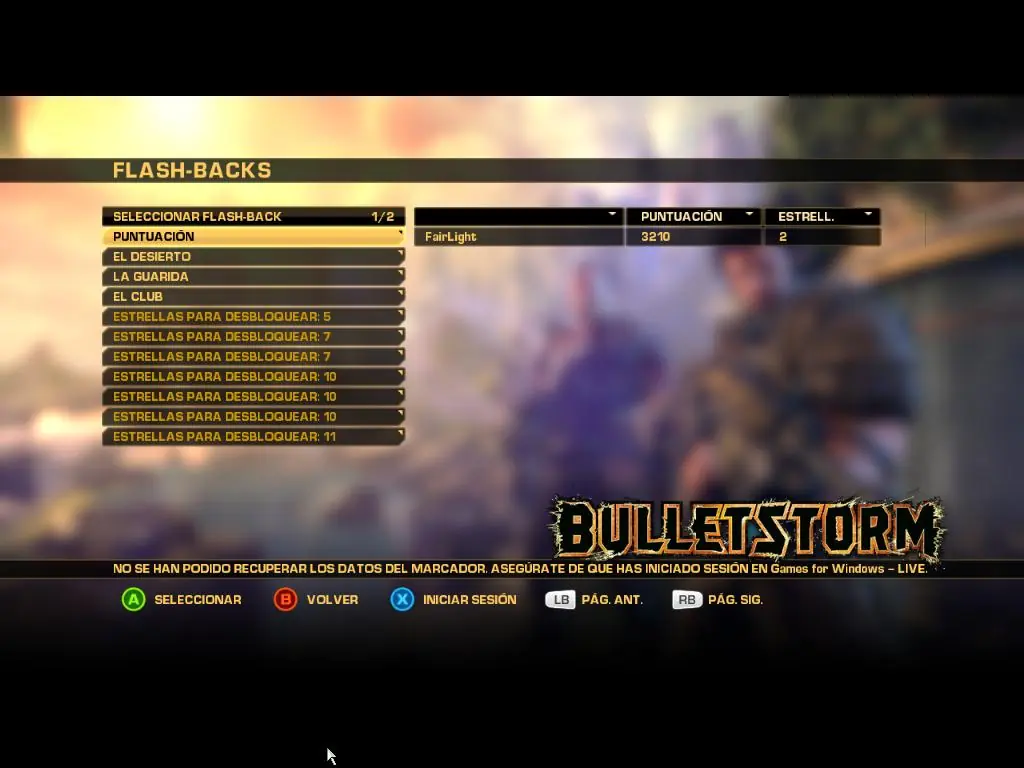


 Espero que les sirva este aporte, si tienen alguna duda, no manden MP, NO respondo MP's. Hacelo por comentarios, otras personas deben tener el mismo problema y con el comentario la ayudas un monton.
Subo de nuevo el post, por que hice algunos cambios en los links.