

 Cómo les va
  les traigo la BETA de este estilo llamado T! V7 que modifica botones, header, logo, MI, perfil, buscador, detalles mínimos, etc
 El estilo cuenta con 2 opciones para que elijan el que más les gusta
Opción 1: Unos retoquesitos
Opción 2: Extra-Minimal
Ahora les dejo unas imágenes de lo que sería el estilo, abrir en una nueva pestaña para ver más grande
Imágenes Opción 1
Imágenes Opción 2
 Quizás el estilo tenga bugs, pero muy mínimos, eso los arreglo en la Beta 2 de este estilo.

 Instalar tema opción 1
← CLICK
Instalar tema opción 2
← CLICK
Instalar tema opción 1
← CLICK
Instalar tema opción 2
← CLICK
¿Cómo instalar?... fácil
Seguí las instrucciones de la imagen

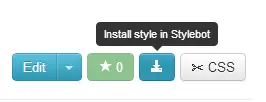 ¿Tenés problemas para instalar algún estilo? acá te dejo los códigos y instrucciones para instalarlo manualmente

Código tema opción 1
textarea.suggest.suggest-mention.suggest-hashtag.body.ui-corner-all.form-input-text.box-shadow-soft.shoutbox-texarea.ubertext {

    border-radius: 1px;

    box-shadow: 0px 0px 0px 0px;

    border-style: solid;

}


div.menu-tabs-perfil.clearfix {

    background: none ;

    background-color: #f7f7f7;

}


li.selected a {

    border-radius: 0px;

}


img.photo {

    box-shadow: -5px 0px green;

}


a.btn.g.hastipsy {

    border-radius: 1px;

    background: none;

    background-color: #ebebeb;

    border-color: #e0e0e0;

    box-shadow: 0px 0px 0px;

}


div.shout-box.clearfix {

    background-color: #f5f5f5;

}


.btn.a:hover {

    border-color: #5dba7a #5dba7a #5dba7a ;

    border-style: solid ;

    border-width: 1px ;

    box-shadow: 0 1px 0 0 #5dba7a inset ;

    text-shadow: 0 -1px 1px #5dba7a ;

}


.btn.a {

    background: none;

    background-color: #5dba7a;

    border-color: #4bad6d;

    text-shadow: 0px 0px ;

}


a.Feed-load.active {

    border-radius: 0px;

}


div.Feed-controls.cont-filterH.recent {

    border-radius: 0px;

    background: none;

    background-color: #ebebeb;

}


div.markItUpHeader {

    border-radius: 0px;

}


textarea.ui-corner-all.form-input-text.box-shadow-soft.ubertext.markItUpEditor.emoji-loaded {

    border-radius: 0px;

}


button.btn.g {

    border-radius: 0px;

    background: none;

    background-color: #e6e6e6;

    box-shadow: 0px 0px 0px;

    border-color: #d9d9d9;

    margin-left: 1px;

}


div.myComment.clearfix {

    background-color: #e7f0f0;

}


a.Feed-load {

    text-shadow: 0px 0px 0px;

}


div.clearfix.shout-footer {

    border-radius: 0px;

}


div.activity-content {

    border-radius: 0px;

    background-color: #f7f7f7;

}


a.date {

    text-shadow: 0px 0px 0px;

}


li.active a {

    border-radius: 0px;

}


ul.tabs.clearfix li a {

    color: #7a7a7a;

}


a.btn.g.not-following {

    border-radius: 0px;

    background: none;

    background-color: #55ba70;

    border-color: #4bad6d;

    box-shadow: 0px 0px 0px 0px;

}


div.btn-text.follow-text {

    text-shadow: 0px 0px 0px;

}


button.my-shout-add.btn.a.floatR.mi {

    border-radius: 0px

;

}


a.btn.g.require-login {

    border-radius: 1px;

    box-shadow: 0px 0px 0px 0px;

    background: none;

    background-color: #5dba7a;

    border-color: #4bad6d;

}


a.btn.g.leave {

    border-radius: 1px;

    background: none;

    background-color: #4bad6d;

    border-color: #4bad6d;

}


i.icon.private-message {

    display: none;

}


a.btn.g {

    border-radius: 0px;

    background: none;

    background-color: #56b373;

    border-color: #699c6f;

}


span.dialog {

    display: none;

}


a.btn.v.floatR {

    border-radius: 0px;

    background: none;

    background-color: #56b373;

    border-color: #699c6f;

    text-shadow: 0px 0px 0px;

    box-shadow: 0px 0px 0px 0px;

}


#menu {

    background: lightgray;

    background-color: #ffffff;

}


div.alert.info {

    border-radius: 0px 0px 0px 0px;

    background-color: #4d96a8;

    text-shadow: 0px 0px 0px

;

    color: #ffffff;

    font-weight: bold;

    border-color: #4e8791;

}


ul.clearfix li span {

    text-transform: uppercase;

    font-size: 9px;

}


span.role strong {

    text-transform: capitalize;

}


ul.clearfix li {

    background: none;

}


span.fn {

    border-style: dotted;

}


#menu-section-musica a {

    border-radius: 0px 0px 0px 0px;

    text-decoration: none;

}


#menu-section-juegos a {

    border-radius: 0px 0px 0px 0px;

    text-decoration: none;

}


#menu-section-tops a {

    border-radius: 0px 0px 0px 0px;

    text-decoration: none;

}


#menu-section-comunidades a {

    border-radius: 0px 0px 0px 0px;

    text-decoration: none;

}


#menu-section-posts a {

    border-radius: 0px 0px 0px 0px;

    text-decoration: none;

}


#menu-section-mi a {

    border-radius: 0px 0px 0px 0px;

}


input.ui-corner-all.form-input-text.box-shadow-soft.floatL {

    border-radius: 0px;

    box-shadow: 0px 0px 0px 0px;

}


div.btn-text {

    text-shadow: 0px 0px 0px ;

    color: white;

}


a.btn.v {

    border-radius: 0px;

    background: none;

    background-color: #56b373;

    border-color: #699c6f;

    text-shadow: 0px 0px 0px;

    box-shadow: 0px 0px 0px 0px;

}


a.btn.r.unfollowing {

    box-shadow: 0px 0px 0px 0px;

    border-radius: 1px;

    background: none;

    background-color: red;

}


div.btn-text.unfollow-text {

    text-shadow: 0px 0px 0px;

}


.btn.r:hover {

    color: #ffffff;

    text-shadow: 0px 0px 0px #C63844;

    text-decoration: none

;

}


#header {

    background: url(http://k35.kn3.net/taringa/1/4/4/4/4/1/24/xxfuryxx/881.jpg?5734);

}


div.view-more-list {

    border-radius: 0px;

    background-color: #a8a8a8;

    border-color: #d4d4d4;

}


div.view-more-list a {

    color: #ffffff;

}


a.notext {

    border-radius: 0px;

}


div.ui-dialog.ui-widget.ui-widget-content.ui-corner-all {

    border-radius: 0px;

}


#logo {

    margin-top: 10px;

}


.navbar {

    border-bottom: 1px solid #252525;

    border-top: 1px solid #363636;

    border-left: 1px solid #0F0F0F;

    border-right: 1px solid #494949;

    background: #106685;

    height: 33px;

    position: absolute;

    right: 245px;

    top: 23px;

    border-color: #106664;

    margin-top: -6px;

}


.navbar .navitem:hover {

    cursor: pointer;

    background: #106896

;

}


.navbar .navitem {

    background: top right;

}


div.navbar.rounded.real-shadow.clearfix {

    border-radius: 4px;

    border-color: #094973;

}


a.btn_search {

    background: url(http://k41.kn3.net/A4E54B283.png)no-repeat;

    margin-top: 0px;

}
Código tema opción 2
#header {

    background: url(http://k19.kn3.net/ECB81F9DF.png);

    margin-bottom: -10px;

}


#menu {

    background: lightgray;

    background-color: #ffffff;

}


#menu-section-comunidades a {

    border-radius: 0px 0px 0px 0px;

    text-decoration: none;

}


#menu-section-juegos a {

    border-radius: 0px 0px 0px 0px;

    text-decoration: none;

}


#menu-section-mi a {

    border-radius: 0px 0px 0px 0px;

}


#menu-section-musica a {

    border-radius: 0px 0px 0px 0px;

    text-decoration: none;

}


#menu-section-posts a {

    border-radius: 0px 0px 0px 0px;

    text-decoration: none;

}


#menu-section-tops a {

    border-radius: 0px 0px 0px 0px;

    text-decoration: none;

}


.btn.a {

    background: none;

    background-color: #5dba7a;

    border-color: #4bad6d;

    text-shadow: 0px 0px ;

}


.btn.a:hover {

    border-color: #5dba7a #5dba7a #5dba7a ;

    border-style: solid ;

    border-width: 1px ;

    box-shadow: 0 1px 0 0 #5dba7a inset ;

    text-shadow: 0 -1px 1px #5dba7a ;

}


.btn.r:hover {

    color: #ffffff;

    text-decoration: none

;

    text-shadow: 0px 0px 0px #C63844;

}


.navbar {

    background: #106685;

    border-bottom: 1px solid #252525;

    border-color: #106664;

    border-left: 1px solid #0F0F0F;

    border-right: 1px solid #494949;

    border-top: 1px solid #363636;

    height: 33px;

    margin-top: -6px;

    position: absolute;

    right: 245px;

    top: 23px;

}


.navbar .navitem {

    background: top right;

}


.navbar .navitem.active, .navbar .navitem.active:hover {

    background: none;

    background-color: #1a5778;

    border-radius: 6px;

    cursor: pointer;

}


.navbar .navitem:hover {

    background: #106896

;

    cursor: pointer;

}


a.Feed-load {

    text-shadow: 0px 0px 0px;

}


a.Feed-load.active {

    border-radius: 0px;

}


a.avatar img {

    box-shadow: 0px 0px 0px 0px;

}


a.btn.g {

    background: none;

    background-color: #56b373;

    border-color: #699c6f;

    border-radius: 1px;

}


a.btn.g.hastipsy {

    background: none;

    background-color: #ebebeb;

    border-color: #e0e0e0;

    border-radius: 1px;

    box-shadow: 0px 0px 0px;

}


a.btn.g.leave {

    background: none;

    background-color: #4bad6d;

    border-color: #4bad6d;

    border-radius: 1px;

}


a.btn.g.not-following {

    background: none;

    background-color: #72cc8f;

    border-color: #4bad6d;

    border-radius: 1px;

    box-shadow: 0px 0px 0px 0px;

}


a.btn.g.require-login {

    background: none;

    background-color: #72cc8f;

    border-color: #4bad6d;

    border-radius: 1px;

    box-shadow: 0px 0px 0px 0px;

}


a.btn.r.unfollowing {

    background: none;

    background-color: red;

    border-radius: 1px;

    box-shadow: 0px 0px 0px 0px;

}


a.btn.v {

    background: none;

    background-color: #56b373;

    border-color: #699c6f;

    border-radius: 1px;

    box-shadow: 0px 0px 0px 0px;

    text-shadow: 0px 0px 0px;

}


a.btn.v.floatR {

    background: none;

    background-color: #72cc8f;

    border-color: #4bad6d;

    border-radius: 1px;

    box-shadow: 0px 0px 0px 0px;

    text-shadow: 0px 0px 0px;

}


a.date {

    text-shadow: 0px 0px 0px;

    text-transform: uppercase;

}


a.notext {

    border-radius: 0px;

}


a.require-login.favorite-tema-tema.ui-btn.ui-state-default.ui-button.ui-widget.ui-corner-all.ui-button-text-only.ui-state-hover {

    -webkit-box-shadow: none;

    background: none;

    background-color: #72cc8f;

    border-color: #4bad6d;

    border-radius: 1px;

    color: none;

    font-size: nonepx;

    font-weight: bold;

    line-height: 0;

}


a.require-login.follow-tema-tema.follow-button.ui-btn.ui-button.ui-widget.ui-state-default.ui-corner-all.ui-button-text-only.ui-state-hover {

    -webkit-box-shadow: none;

    background: none;

    background-color: #72cc8f;

    border-color: #4bad6d;

    border-radius: 1px;

    color: none;

    font-size: nonepx;

    font-weight: bold;

    line-height: 0;

}


a.require-login.ui-btn.ui-button.ui-widget.ui-state-default.ui-corner-all.ui-button-text-only.ui-state-hover {

    -webkit-box-shadow: none;

    background: none;

    background-color: #72cc8f;

    border-color: #4bad6d;

    border-radius: 1px;

    color: none;

    font-size: nonepx;

    font-weight: bold;

    line-height: 0;

}


a.ui-btn.require-login.ui-button.ui-widget.ui-state-default.ui-corner-all.ui-button-text-only.ui-state-hover {

    background: none;

    background-color: #72cc8f;

    border-color: #4bad6d;

    border-radius: 1px;

    box-shadow: 0px 0px 0px 0px;

}


button.btn.g {

    background: none;

    background-color: #e6e6e6;

    border-color: #d9d9d9;

    border-radius: 1px;

    box-shadow: 0px 0px 0px;

    margin-left: 1px;

}


button.my-shout-add.btn.a.floatR.mi {

    background-color: #72cc8f;

    border-radius: 0px

;

}


button.my-shout-add.btn.a.floatR.wall {

    border-radius: 1px;

}


div.Feed-controls.cont-filterH.recent {

    background: none;

    background-color: #ebebeb;

    border-radius: 1px;

}


div.activity-content {

    background-color: #f7f7f7;

    border-radius: 2px 2px 0px 0px;

}


div.alert.info {

    background-color: #5aa9bd;

    border-color: #4e8791;

    border-radius: 1px;

    color: #ffffff;

    font-weight: bold;

    text-shadow: 0px 0px 0px

;

}


div.box.sticky.real-shadow {

    border-radius: 1px;

}


div.btn-text {

    color: white;

    text-shadow: 0px 0px 0px ;

}


div.btn-text.follow-text {

    text-shadow: 0px 0px 0px;

}


div.btn-text.unfollow-text {

    text-shadow: 0px 0px 0px;

}


div.clearfix.shout-footer {

    border-radius: 0px 0px 2px 2px;

}


div.markItUpHeader {

    border-radius: 0px;

}


div.menu-tabs-perfil.clearfix {

    background: none ;

    background-color: #f7f7f7;

}


div.myComment.clearfix {

    background-color: #e7f0f0;

}


div.navbar.rounded.real-shadow.clearfix {

    border-color: #094973;

    border-radius: 6px;

    margin-top: -13px;

}


div.textrank-tags.home {

    border-style: none;

}


div.ui-dialog.ui-widget.ui-widget-content.ui-corner-all {

    border-radius: 0px;

}


div.view-more-list {

    background-color: #72cc8f ;

    border-color: #4bad6d;

    border-radius: 0px;

}


div.view-more-list a {

    color: #ffffff;

    font-size: 10px;

    text-transform: uppercase;

}


i.icon.private-message {

    display: none;

}


input.searchq.fast-search.suggest.suggest-mention.suggest-hashtag {

    background: url(http://k45.kn3.net/BA5E0F0CC.png) no-repeat;

    margin-left: 2px;

    margin-top: -7px;

}


input.ui-corner-all.form-input-text.box-shadow-soft.floatL {

    border-radius: 0px;

    box-shadow: 0px 0px 0px 0px;

}


li.active a {

    border-radius: 0px;

}


li.selected a {

    border-radius: 0px;

}


span.dialog {

    display: none;

}


span.fn {

    border-style: dotted;

}


span.role strong {

    text-transform: capitalize;

}


span.ui-button-text {

    text-shadow: 0px 0px 0px;

}


textarea.suggest.suggest-mention.suggest-hashtag.body.ui-corner-all.form-input-text.box-shadow-soft.shoutbox-texarea.ubertext {

    border-radius: 1px;

    border-style: solid;

    box-shadow: 0px 0px 0px 0px;

}


textarea.ui-corner-all.form-input-text.box-shadow-soft.ubertext.markItUpEditor.emoji-loaded {

    border-radius: 0px;

}


ul.clearfix li span {

    font-size: 9px;

    text-transform: uppercase;

}


ul.tabs.clearfix li a {

    color: #575757;

}


#logo {

    background: url(http://k38.kn3.net/5DD6011BE.png);

    margin-left: -7px;

    padding-right: 25px;

    padding-top: 12px;

    margin-top: -9px;

}


span.rank.online.hastipsy a {

    color: #538a5b;

}


a.btn_search {

    margin-right: -2px;

    margin-top: -7px;

}
Instalación
1) Clickear en "CSS" en la parte superior derecha
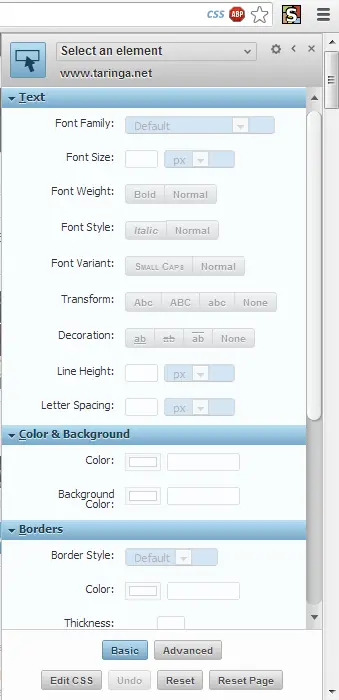
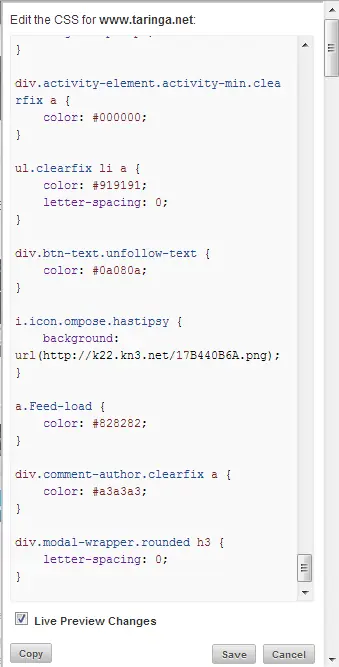
2) Clickear "Edit CSS" y pegar el código
 Cualquier duda mandame un MP, soy activa
Gracias por pasar
Cualquier duda mandame un MP, soy activa
Gracias por pasar